Webhooks
A webhook is an address on your server or at an automation service that OpenEOS sends a message to as soon as something happens: an order is paid, a refund is booked, an event starts real sales. OpenEOS sends a POST request with a JSON body to that address, signed with a secret key that only you and OpenEOS know.
That way you can, for example, transfer every paid order to your club's bookkeeping, post a message to your team chat for shop orders, or update a display of your own – without asking over and over again.
Webhooks or API?
The REST API and webhooks complement each other:
| API | Webhooks | |
|---|---|---|
| Direction | Your program asks OpenEOS (pull) | OpenEOS notifies your program (push) |
| Good for | Reading and changing data whenever you want: maintaining products, fetching reports, exporting orders | Reacting right away when something happens: paid order, refund, phase change |
| Drawback | Waiting for changes means asking regularly, which uses up the limits | You need a publicly reachable HTTPS address that accepts requests |
| Credentials | API token (oeos_…) | A secret per webhook (whsec_…) to verify the signature |
Often you combine both: the webhook tells you that something changed; if you need more data or the current state, you fetch it through the API.
Setting up
Only administrators of the organization manage webhooks. Members see a notice in this place.
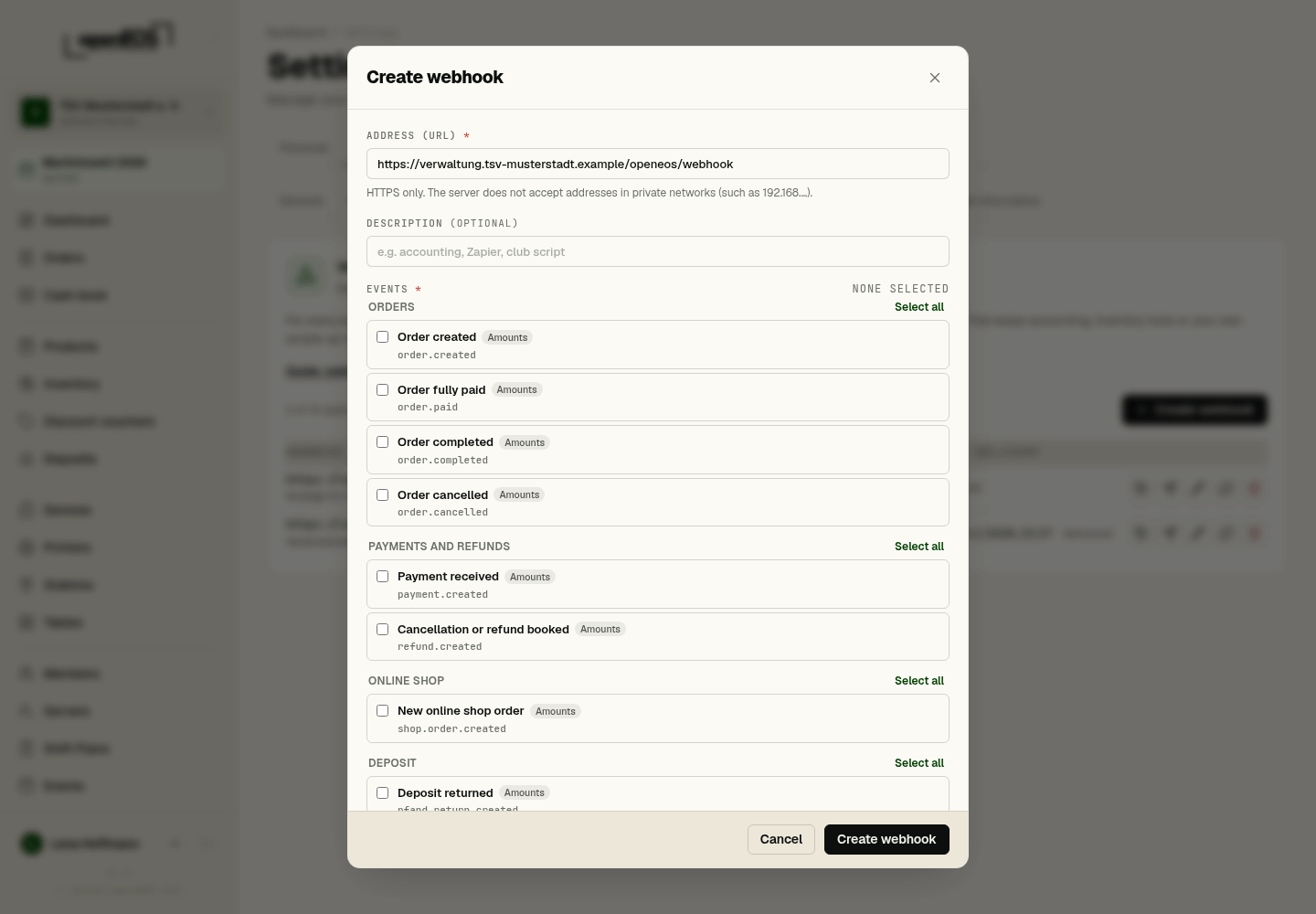
- Sign in as an administrator and open Settings → Organization → Webhooks.
- Click Create webhook.
- Under Address (URL) enter the address OpenEOS should send to. It must start with
https://and be publicly reachable (see Requirements for the URL). - Optionally add a description, for example "Bookkeeping" or "n8n shop notification".
- Under Events select what you want to receive (at least one, see Events). The events are grouped by area, such as Orders or Payments and refunds; Select all or None picks them all at once. Less is better.
- Under Options, turn on Include test orders and Include guest data if needed. Both start switched off (see Test orders and Guest data). The Active switch is on.
- Click Create webhook. OpenEOS now shows the secret (
whsec_…) in the Webhook created window. Copy it right away and store it with your receiver. It is shown exactly once; afterwards you only see its beginning, such aswhsec_3fA9….
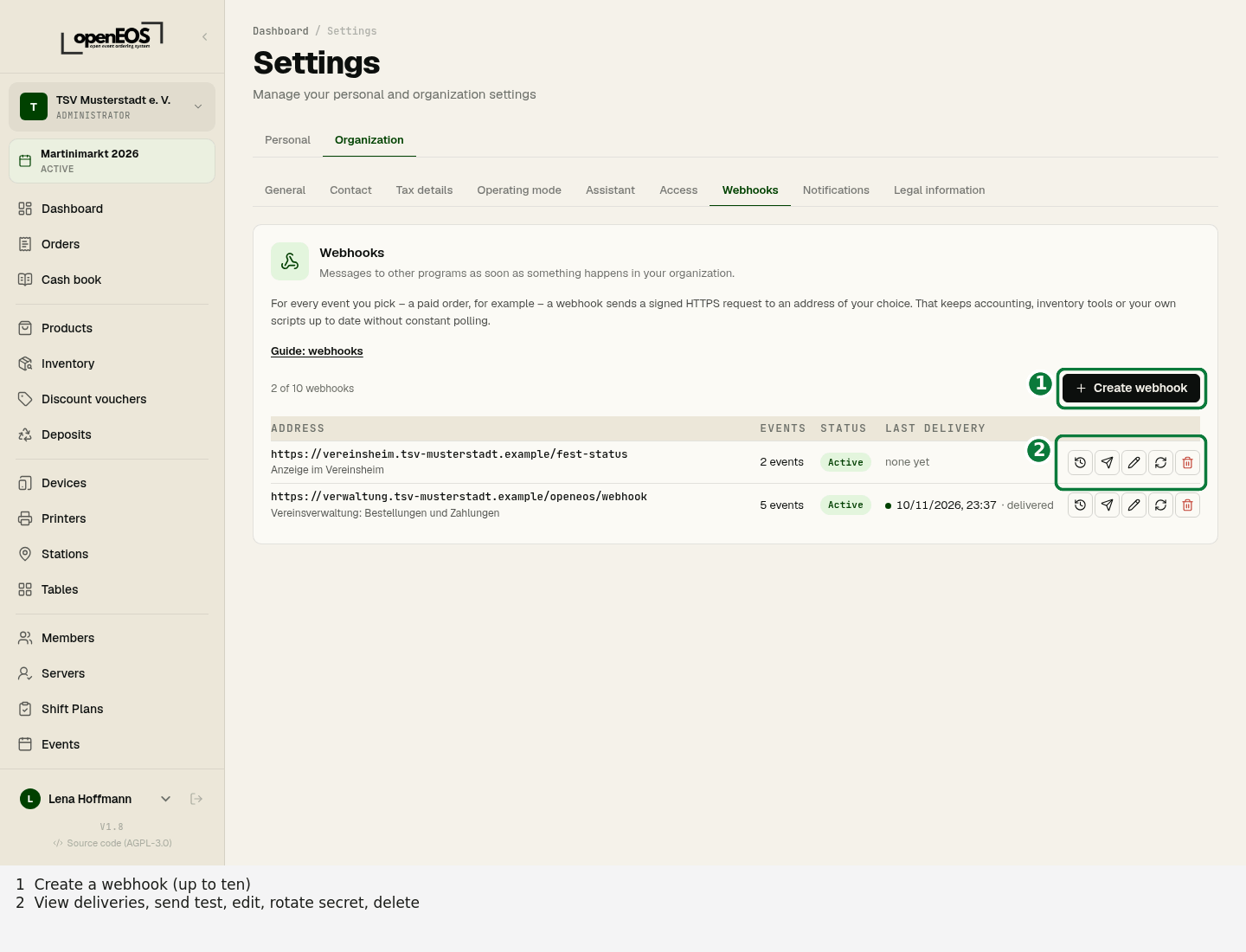
An organization can have at most 10 webhooks; above the list you see how many you have created (for example "2 of 10 webhooks"). Each webhook has its own secret and its own selection of events.
The list of webhooks
The list under Settings → Organization → Webhooks shows each webhook's Address, Events, Status and Last delivery. The status is Active, Paused or Disabled automatically; if deliveries are currently failing, it shows for example "Failing since …". Under Actions you find Edit, Send test, Rotate secret, View deliveries and Delete.
Send test
Send test makes OpenEOS send an event of type ping to the URL right away – even while the webhook is switched off. Use it to check that your receiver is reachable and verifies the signature correctly before real events arrive. The result shows up in the delivery log after a few seconds.
Delivery log
Every webhook has a log of its deliveries, newest first. You open it from the list with View deliveries. At the top you see the webhook's address, events, secret prefix and options; you filter the list by Status and Event and reload it with Refresh. For each delivery you see:
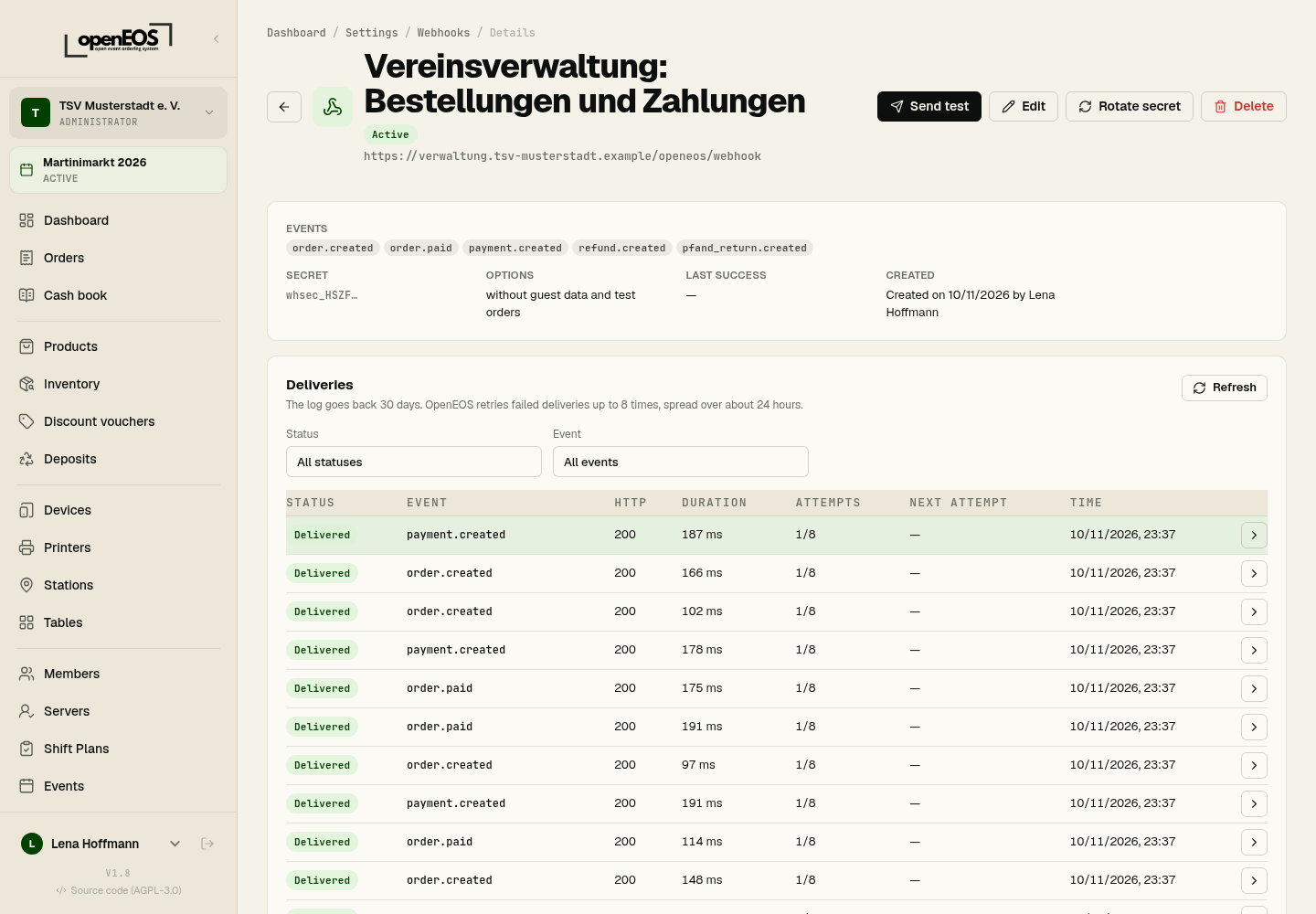
- the event type and time,
- the status: Pending, Sending, Delivered or Failed,
- the number of attempts (at most 8) and, if another one is due, when the next one runs,
- the HTTP status of your response, the duration and, if applicable, an error code.
The detail view of a delivery also shows the event ID and delivery ID, under Payload (JSON) the exact body OpenEOS sent, under Receiver response the beginning of your response (at most 1 KB) and under Attempts every single attempt. The log is kept for 30 days. Secrets never end up in it.
Redeliver
You can trigger a delivery from the log once more with Redeliver, for example after fixing a bug in your receiver. This is a new delivery with a new delivery ID, but with the same event ID and the same body. If your receiver has already processed the event, this is how it recognizes it (see Duplicate deliveries).
Rotating the secret
Rotate secret gives you a new secret – again shown exactly once. So you can switch your receiver over without rushing, the old secret stays valid for another 24 hours: during that time OpenEOS signs every delivery with both secrets, and the OpenEOS-Signature header contains two v1 values. Your receiver only needs to confirm one of them – the examples already do this correctly. The webhook shows when the old secret expires.
Rotate the secret immediately if it may have fallen into the wrong hands, for example because it was posted in a chat, a ticket or a public repository.
Switching off and deleting
The Active switch (under Edit → Options) pauses a webhook, and the list then shows it as Paused: while it is off, OpenEOS sends no events to it, and deliveries still pending end as failed (ENDPOINT_INACTIVE). Delete removes the webhook including its log; this is only possible in the app, not with an API token.
Events
| Type | When | Content of data | Amounts |
|---|---|---|---|
order.created | An order was created – shop orders included (they also trigger shop.order.created). Where it comes from is in source: till (pos), shop (online) or QR ordering at the table (qr_order). | order | yes¹ |
order.paid | An order is fully paid (paymentStatus becomes paid). | order | yes |
order.completed | An order is completed, i.e. handed out, picked up or served. | order | yes¹ |
order.cancelled | An order was cancelled. | order | yes¹ |
payment.created | A payment was booked – cash, card or online. | payment | yes |
refund.created | A cancellation with repayment or a refund was booked (kind). | refund | yes |
shop.order.created | A (paid) order came in through the online shop. Sent in addition to order.created – subscribe to only one of them if you don't want to count shop orders twice. | order | yes |
pfand_return.created | A deposit return was booked at the till. | pfandReturn | yes |
event.activated | An event was activated. | event | no |
event.phase_changed | An event changes its phase, for example from planned to active at the start of sales. | event, previousPhase, phase | no |
cash_point_closing.created | A cash point closing was created – only with the cloud TSE. | closing | no |
product.updated | A product's name, price, tax rate, category or its active or available switch changed. Not for stock changes caused by sales. | product, changed | yes¹ (price) |
ping | Only through Send test; cannot be subscribed to. | webhookId, message | no |
¹ Without amounts and prices in the Orders only operating mode.
The API also returns the list of event types with group and description at GET /organizations/{organizationId}/webhooks/info.
Structure of a delivery
Every delivery is a POST request with Content-Type: application/json. The body always has the same envelope:
{
  "id": "6f1c2d3e-8a4b-4c5d-9e6f-0a1b2c3d4e5f",
  "type": "order.paid",
  "apiVersion": "2026-11-10",
  "createdAt": "2026-11-14T18:04:11.201Z",
  "organizationId": "0b6e1f7a-2c3d-4e5f-8a9b-1c2d3e4f5a6b",
  "data": { "order": { "…": "…" } }
}
| Field | Meaning |
|---|---|
id | ID of the event. Stays the same for retries and for Redeliver – use it to recognize duplicate deliveries. Also sent in the OpenEOS-Event-Id header. |
type | Event type from the table above |
apiVersion | Version of the format, currently 2026-11-10 |
createdAt | When the change happened, in UTC – not when it was delivered |
organizationId | Your organization |
data | The event's data, depending on the type (see below) |
Amounts are numbers in euros (currency is EUR), for example 4.5 for €4.50. Tax rates are percentages, for example 19. Timestamps are ISO 8601 in UTC. Ignore fields you do not know – new ones may be added.
Content per event
order.*andshop.order.created–data.orderwithid,orderNumber,dailyNumber,eventId,status(open,in_progress,ready,completed,cancelled),paymentStatus(unpaid,partly_paid,paid,refunded),source(pos,online,qr_order),fulfillmentType(table_service,counter_pickupornull),tableNumber,isTest,currency,createdAt,completedAt,cancelledAt,amountsanditems.amounts:subtotal,taxTotal,total,paidAmount,tipAmount,discountAmount,refundedAmount,pfandTotal–nullin Orders only.items[]:id,productId,productName,categoryName,quantity,unitPrice,totalPrice,taxRate,options(list of the selected options as text) andstatus– without the three price fields in Orders only.guestwithname,phone,notes– only if Include guest data is on (see Guest data).
payment.created–data.paymentwithid,orderId,orderNumber,eventId,method,provider,amount,status,isTest,createdAt.refund.created–data.refundwithid,refundNumber,orderId,orderNumber,eventId,kind(cancellationorrefund),amount,taxTotal,pfandAmount,tipAmount,paymentMethod,status(completed,manual,test),reasonCode,isTest,createdAtanditems[]withproductName,quantity,amount.pfand_return.created–data.pfandReturnwithid,returnNumber,eventId,totalAmount,lines[](pfandTypeId,name,unitAmount,quantity),isTest,createdAt.event.activated–data.eventwithid,name,startDate,endDate,status,phase.event.phase_changed–data.eventas above, plusdata.previousPhaseanddata.phase. Possible phases:inactive,test(test mode),planned,active,ended.cash_point_closing.created–data.closingwithid,registerId,zNr,businessDate,periodFrom,periodTo,transactionCount,trigger(scheduledormanual),createdAt.product.updated–data.productwithid,eventId,categoryId,name,price,taxRate,isActive,isAvailable,trackInventory,stockQuantity, anddata.changed, the list of changed fields. WithoutpriceandtaxRatein Orders only.ping–data.webhookIdanddata.message(Test von OpenEOS).
Example: order.paid
A paid order at the till, webhook without guest data:
{
  "id": "6f1c2d3e-8a4b-4c5d-9e6f-0a1b2c3d4e5f",
  "type": "order.paid",
  "apiVersion": "2026-11-10",
  "createdAt": "2026-11-14T18:04:11.201Z",
  "organizationId": "0b6e1f7a-2c3d-4e5f-8a9b-1c2d3e4f5a6b",
  "data": {
    "order": {
      "id": "9a8b7c6d-5e4f-4a3b-8c2d-1e0f9a8b7c6d",
      "orderNumber": "20261114-0042",
      "dailyNumber": 42,
      "eventId": "3c4d5e6f-7a8b-4c9d-8e0f-1a2b3c4d5e6f",
      "status": "in_progress",
      "paymentStatus": "paid",
      "source": "pos",
      "fulfillmentType": "counter_pickup",
      "tableNumber": null,
      "isTest": false,
      "currency": "EUR",
      "createdAt": "2026-11-14T18:03:52.877Z",
      "completedAt": null,
      "cancelledAt": null,
      "amounts": {
        "subtotal": 13,
        "taxTotal": 1.7,
        "total": 13,
        "paidAmount": 13,
        "tipAmount": 0,
        "discountAmount": 0,
        "refundedAmount": 0,
        "pfandTotal": 0
      },
      "items": [
        {
          "id": "1d2e3f4a-5b6c-4d7e-8f9a-0b1c2d3e4f5a",
          "productId": "7e8f9a0b-1c2d-4e3f-9a4b-5c6d7e8f9a0b",
          "productName": "Bier 0,5 l",
          "categoryName": "Getränke",
          "quantity": 2,
          "unitPrice": 4.5,
          "totalPrice": 9,
          "taxRate": 19,
          "options": [],
          "status": "pending"
        },
        {
          "id": "2e3f4a5b-6c7d-4e8f-9a0b-1c2d3e4f5a6b",
          "productId": "8f9a0b1c-2d3e-4f4a-8b5c-6d7e8f9a0b1c",
          "productName": "Bratwurst",
          "categoryName": "Essen",
          "quantity": 1,
          "unitPrice": 4,
          "totalPrice": 4,
          "taxRate": 7,
          "options": ["mit Senf"],
          "status": "preparing"
        }
      ]
    }
  }
}
A paid order from the online shop, webhook with guest data – the only difference is the guest object:
{
  "id": "a4b5c6d7-e8f9-4a0b-9c1d-2e3f4a5b6c7d",
  "type": "order.paid",
  "apiVersion": "2026-11-10",
  "createdAt": "2026-11-14T16:21:40.512Z",
  "organizationId": "0b6e1f7a-2c3d-4e5f-8a9b-1c2d3e4f5a6b",
  "data": {
    "order": {
      "id": "b5c6d7e8-f9a0-4b1c-8d2e-3f4a5b6c7d8e",
      "orderNumber": "20261114-0017",
      "dailyNumber": 17,
      "eventId": "3c4d5e6f-7a8b-4c9d-8e0f-1a2b3c4d5e6f",
      "status": "open",
      "paymentStatus": "paid",
      "source": "online",
      "fulfillmentType": "counter_pickup",
      "tableNumber": null,
      "isTest": false,
      "currency": "EUR",
      "createdAt": "2026-11-14T16:20:58.031Z",
      "completedAt": null,
      "cancelledAt": null,
      "amounts": {
        "subtotal": 15.5,
        "taxTotal": 1.58,
        "total": 15.5,
        "paidAmount": 15.5,
        "tipAmount": 0,
        "discountAmount": 0,
        "refundedAmount": 0,
        "pfandTotal": 0
      },
      "items": [
        {
          "id": "c6d7e8f9-a0b1-4c2d-9e3f-4a5b6c7d8e9f",
          "productId": "d7e8f9a0-b1c2-4d3e-8f4a-5b6c7d8e9f0a",
          "productName": "Flammkuchen",
          "categoryName": "Essen",
          "quantity": 1,
          "unitPrice": 9.5,
          "totalPrice": 9.5,
          "taxRate": 7,
          "options": ["ohne Zwiebeln"],
          "status": "pending"
        },
        {
          "id": "e8f9a0b1-c2d3-4e4f-9a5b-6c7d8e9f0a1b",
          "productId": "f9a0b1c2-d3e4-4f5a-8b6c-7d8e9f0a1b2c",
          "productName": "Apfelschorle 0,4 l",
          "categoryName": "Getränke",
          "quantity": 2,
          "unitPrice": 3,
          "totalPrice": 6,
          "taxRate": 19,
          "options": [],
          "status": "pending"
        }
      ],
      "guest": {
        "name": "Anna Beispiel",
        "phone": "+49 151 23456789",
        "notes": "Abholung gegen 19 Uhr"
      }
    }
  }
}
Example: refund.created
{
  "id": "0a1b2c3d-4e5f-4a6b-8c7d-9e0f1a2b3c4d",
  "type": "refund.created",
  "apiVersion": "2026-11-10",
  "createdAt": "2026-11-14T18:31:07.044Z",
  "organizationId": "0b6e1f7a-2c3d-4e5f-8a9b-1c2d3e4f5a6b",
  "data": {
    "refund": {
      "id": "4d5e6f7a-8b9c-4d0e-9f1a-2b3c4d5e6f7a",
      "refundNumber": "20261114-0042-E1",
      "orderId": "9a8b7c6d-5e4f-4a3b-8c2d-1e0f9a8b7c6d",
      "orderNumber": "20261114-0042",
      "eventId": "3c4d5e6f-7a8b-4c9d-8e0f-1a2b3c4d5e6f",
      "kind": "refund",
      "amount": 4.5,
      "taxTotal": 0.72,
      "pfandAmount": 0,
      "tipAmount": 0,
      "paymentMethod": "cash",
      "status": "completed",
      "reasonCode": "quality",
      "isTest": false,
      "createdAt": "2026-11-14T18:31:06.990Z",
      "items": [
        { "productName": "Bier 0,5 l", "quantity": 1, "amount": 4.5 }
      ]
    }
  }
}
Example: event.phase_changed
The start of sales: the event changes from planned to active.
{
  "id": "5e6f7a8b-9c0d-4e1f-8a2b-3c4d5e6f7a8b",
  "type": "event.phase_changed",
  "apiVersion": "2026-11-10",
  "createdAt": "2027-07-09T16:00:00.318Z",
  "organizationId": "0b6e1f7a-2c3d-4e5f-8a9b-1c2d3e4f5a6b",
  "data": {
    "event": {
      "id": "3c4d5e6f-7a8b-4c9d-8e0f-1a2b3c4d5e6f",
      "name": "Sommerfest 2027",
      "startDate": "2027-07-09T22:00:00.000Z",
      "endDate": "2027-07-11T21:59:59.000Z",
      "status": "active",
      "phase": "active"
    },
    "previousPhase": "planned",
    "phase": "active"
  }
}
Example: ping
{
  "id": "7a8b9c0d-1e2f-4a3b-9c4d-5e6f7a8b9c0d",
  "type": "ping",
  "apiVersion": "2026-11-10",
  "createdAt": "2026-11-10T09:15:00.000Z",
  "organizationId": "0b6e1f7a-2c3d-4e5f-8a9b-1c2d3e4f5a6b",
  "data": {
    "webhookId": "8b9c0d1e-2f3a-4b4c-8d5e-6f7a8b9c0d1e",
    "message": "Test von OpenEOS"
  }
}
"Orders only" operating mode
If your organization runs in the Orders only (Nur Bons) operating mode, there are no prices and no payments in OpenEOS. Webhooks reflect that:
- In orders,
amountsisnull, and the items have nounitPrice,totalPriceandtaxRate. product.updatedcomes withoutpriceandtaxRate.payment.createdandrefund.createdare not sent.order.paid,shop.order.createdandpfand_return.createdpractically never occur, because OpenEOS takes no payments in this mode and there is no shop or deposit.
So always evaluate amounts in a way that allows null.
Test orders
In test mode and in the planned phase, OpenEOS books test orders (see Phases). They are only sent to webhooks with Include test orders switched on, and then carry isTest: true – as do payments, refunds and deposit returns from test orders.
Switch the option on while you build your integration, and filter on isTest in your receiver so test bookings do not end up in your bookkeeping. Test orders are deleted in OpenEOS on activation and at the start of sales; whatever your receiver has already received, you have to remove there yourself.
Guest data and data protection
Orders – for example from the shop or via QR code – can contain guest data: the guest's name, phone number and note. By default OpenEOS does not send them. Only when you switch on Include guest data for a webhook do orders contain the guest object.
With Include guest data, OpenEOS transmits personal data of your guests to the URL you enter. Under the GDPR, your club is the controller: you decide where the data goes, and you are responsible for the receiver processing it lawfully – for example with a data processing agreement if a service provider processes it on your behalf – and deleting it again.
- Switch the option on only if the receiver really needs the data, for example to notify guests when their order is ready for pickup.
- In OpenEOS, guest data is deleted 30 days after the event ends (see Automatic deletion periods). That deletion does not cover what has arrived at the receiver.
- Deliveries are kept in the delivery log including their body for 30 days – with the option switched on, that includes the guest data.
Headers
| Header | Content |
|---|---|
Content-Type | application/json |
User-Agent | OpenEOS-Webhooks/1.0 (+https://docs.openeos.de/integrationen/webhooks) |
OpenEOS-Event-Id | ID of the event, same as id in the body |
OpenEOS-Event-Type | Event type, for example order.paid |
OpenEOS-Delivery-Id | ID of the delivery. Stays the same for automatic retries, new for Redeliver. |
OpenEOS-Delivery-Attempt | Number of the attempt, 1 to 8 |
OpenEOS-Signature | t=<Unix time in seconds>,v1=<signature> – for 24 hours after rotating the secret with a second v1=… |
Verifying the signature
Verify the signature on every request. That is the only way to know it really comes from OpenEOS and was not altered on the way. This is how:
- Read the raw body exactly as it arrives – before a framework parses it as JSON. If you parse the body first and turn it back into text, you get different bytes and a wrong signature.
- Split the
OpenEOS-Signatureheader at the commas:tis the time of signing (Unix seconds), eachv1is a signature. There can be severalv1values. - Check the timestamp: if
tdiffers from your clock by more than 300 seconds, reject the request. This prevents someone from replaying an intercepted request later. Your server clock should therefore be synchronized via NTP. - Compute the expected signature: HMAC-SHA256 with the secret as key over
t, a period and the raw body, i.e. over<t>.<body>, as a lowercase hex string. Use the whole secret includingwhsec_as the key. - Compare it with every
v1in constant time (crypto.timingSafeEqual,hmac.compare_digest,hash_equals) – not with==. If one matches, the request is genuine.
With Redeliver, OpenEOS signs again with the current time. So the timestamp check does not fail, even if the event itself is older.
The following examples are complete small receivers. They read the secret from the OPENEOS_WEBHOOK_SECRET environment variable, respond with 204 right away and process the event afterwards.
Node.js (Express)
// npm install express
const crypto = require('node:crypto');
const express = require('express');

const SECRET = process.env.OPENEOS_WEBHOOK_SECRET; // whsec_…
const TOLERANCE_SECONDS = 300;

function verifySignature(rawBody, header, secret) {
  if (!Buffer.isBuffer(rawBody) || typeof header !== 'string' || !secret) return false;

  let timestamp = null;
  const signatures = [];
  for (const part of header.split(',')) {
    const [key, value] = part.trim().split('=', 2);
    if (key === 't') timestamp = value;
    else if (key === 'v1' && value) signatures.push(value);
  }
  if (!/^\d+$/.test(timestamp ?? '') || signatures.length === 0) return false;

  // Reject old (replayed) requests
  const age = Math.abs(Math.floor(Date.now() / 1000) - Number(timestamp));
  if (age > TOLERANCE_SECONDS) return false;

  const expected = crypto
    .createHmac('sha256', secret)
    .update(`${timestamp}.`)
    .update(rawBody)
    .digest();

  // For 24 h after a secret rotation there are two v1 values – one has to match.
  return signatures.some(
    (signature) =>
      /^[0-9a-f]{64}$/i.test(signature) &&
      crypto.timingSafeEqual(Buffer.from(signature, 'hex'), expected),
  );
}

const app = express();

// Raw body instead of express.json(): the signature covers the bytes as they arrive.
// If you use app.use(express.json()) globally, register this route before it.
app.post('/webhooks/openeos', express.raw({ type: 'application/json', limit: '1mb' }), (req, res) => {
  if (!verifySignature(req.body, req.get('OpenEOS-Signature'), SECRET)) {
    return res.status(400).send('invalid signature');
  }

  const event = JSON.parse(req.body.toString('utf8'));
  res.sendStatus(204); // acknowledge right away, process afterwards

  setImmediate(() => {
    handleEvent(event).catch((err) => console.error('Webhook processing failed', event.id, err));
  });
});

// In production: a table with a unique column for the event ID instead of an in-memory Set
const processedEventIds = new Set();

async function handleEvent(event) {
  if (processedEventIds.has(event.id)) return; // already processed (retry)
  processedEventIds.add(event.id);

  switch (event.type) {
    case 'order.paid': {
      const { order } = event.data;
      console.log('Paid:', order.orderNumber, order.amounts ? order.amounts.total : '(orders only)');
      break;
    }
    case 'ping':
      console.log('Test from OpenEOS received');
      break;
    default:
      console.log('Event:', event.type, event.id);
  }
}

app.listen(Number(process.env.PORT) || 3000);
Python (Flask)
# pip install flask
import hashlib
import hmac
import json
import os
import threading
import time

from flask import Flask, request

SECRET = os.environ["OPENEOS_WEBHOOK_SECRET"]  # whsec_…
TOLERANCE_SECONDS = 300

app = Flask(__name__)


def verify_signature(raw_body, header, secret):
    if not header or not secret:
        return False

    timestamp = None
    signatures = []
    for part in header.split(","):
        key, _, value = part.strip().partition("=")
        if key == "t":
            timestamp = value
        elif key == "v1" and value:
            signatures.append(value)
    if not timestamp or not (timestamp.isascii() and timestamp.isdigit()) or not signatures:
        return False

    # Reject old (replayed) requests
    if abs(time.time() - int(timestamp)) > TOLERANCE_SECONDS:
        return False

    expected = hmac.new(
        secret.encode(), timestamp.encode() + b"." + raw_body, hashlib.sha256
    ).hexdigest()

    # For 24 h after a secret rotation there are two v1 values – one has to match.
    return any(
        hmac.compare_digest(expected.encode(), signature.lower().encode())
        for signature in signatures
    )


@app.post("/webhooks/openeos")
def openeos_webhook():
    raw_body = request.get_data()  # raw bytes, before any JSON parsing
    if not verify_signature(raw_body, request.headers.get("OpenEOS-Signature"), SECRET):
        return "invalid signature", 400

    event = json.loads(raw_body)
    # Acknowledge right away, process afterwards (in production, better: a queue)
    threading.Thread(target=handle_event, args=(event,), daemon=True).start()
    return "", 204


# In production: a table with a unique column for the event ID instead of an in-memory set
processed_event_ids = set()


def handle_event(event):
    if event["id"] in processed_event_ids:
        return  # already processed (retry)
    processed_event_ids.add(event["id"])

    if event["type"] == "order.paid":
        order = event["data"]["order"]
        total = order["amounts"]["total"] if order["amounts"] else "(orders only)"
        print("Paid:", order["orderNumber"], total)
    elif event["type"] == "ping":
        print("Test from OpenEOS received")
    else:
        print("Event:", event["type"], event["id"])


if __name__ == "__main__":
    app.run(port=int(os.environ.get("PORT", "3000")))
With FastAPI, read the raw body with raw_body = await request.body() (parameter request: Request) and use the same verify_signature function. Do not let FastAPI parse the body into a model first.
PHP
<?php
// Read the raw body – not $_POST, and no json_decode() before verifying.
$secret = (string) getenv('OPENEOS_WEBHOOK_SECRET'); // whsec_…
const OPENEOS_TOLERANCE_SECONDS = 300;

function openeos_verify_signature(string $rawBody, string $header, string $secret): bool
{
    if ($header === '' || $secret === '') {
        return false;
    }

    $timestamp = null;
    $signatures = [];
    foreach (explode(',', $header) as $part) {
        $pair = explode('=', trim($part), 2);
        if (count($pair) !== 2) {
            continue;
        }
        if ($pair[0] === 't') {
            $timestamp = $pair[1];
        } elseif ($pair[0] === 'v1' && $pair[1] !== '') {
            $signatures[] = strtolower($pair[1]);
        }
    }
    if ($timestamp === null || !preg_match('/\A\d+\z/', $timestamp) || $signatures === []) {
        return false;
    }

    // Reject old (replayed) requests
    if (abs(time() - (int) $timestamp) > OPENEOS_TOLERANCE_SECONDS) {
        return false;
    }

    $expected = hash_hmac('sha256', $timestamp . '.' . $rawBody, $secret);

    // For 24 h after a secret rotation there are two v1 values – one has to match.
    foreach ($signatures as $signature) {
        if (hash_equals($expected, $signature)) {
            return true;
        }
    }
    return false;
}

function openeos_handle_event(array $event): void
{
    // Store the event ID here (column with a UNIQUE index) and skip duplicates.
    switch ($event['type']) {
        case 'order.paid':
            $order = $event['data']['order'];
            $total = $order['amounts'] !== null ? $order['amounts']['total'] : '(orders only)';
            error_log('Paid: ' . $order['orderNumber'] . ' ' . $total);
            break;
        case 'ping':
            error_log('Test from OpenEOS received');
            break;
        default:
            error_log('Event: ' . $event['type'] . ' ' . $event['id']);
    }
}

$rawBody = (string) file_get_contents('php://input');
$header = $_SERVER['HTTP_OPENEOS_SIGNATURE'] ?? '';

if (!openeos_verify_signature($rawBody, $header, $secret)) {
    http_response_code(400);
    exit('invalid signature');
}

$event = json_decode($rawBody, true);

// Acknowledge right away, process afterwards
http_response_code(204);
if (function_exists('fastcgi_finish_request')) {
    fastcgi_finish_request(); // PHP-FPM: send the response, keep the script running
}
openeos_handle_event($event);
Delivery and retries
OpenEOS delivers events in the background, usually 2 to 10 seconds after the change.
- A delivery succeeds if your server responds with a
2xxstatus within 10 seconds. What your response body contains does not matter. - OpenEOS does not follow redirects (
301,302, …); they count as failures (REDIRECT_NOT_FOLLOWED). Enter the final URL. - Any other response, a timeout or a connection error counts as a failed attempt. OpenEOS then tries again:
| Attempt | Delay after the previous one | Roughly after |
|---|---|---|
| 1 | immediately | 0 |
| 2 | 1 minute | 1 min |
| 3 | 5 minutes | 6 min |
| 4 | 30 minutes | 36 min |
| 5 | 2 hours | 2 h 36 min |
| 6 | 5 hours | 7 h 36 min |
| 7 | 8 hours | 15 h 36 min |
| 8 | 8 hours | 23 h 36 min |
The delays vary by ±10 % so that retries do not all arrive at once. After the 8th attempt the delivery is considered failed; you can trigger it again yourself later with Redeliver.
Duplicate deliveries and ordering
- At least once: OpenEOS delivers every event at least once, and in rare cases more than once – for example if your
2xxresponse did not arrive in time. So remember the event ID (idorOpenEOS-Event-Id) and skip events you have already processed. - Order without guarantee: per webhook, OpenEOS sends events in the order they happened. If a delivery had to be retried, a later event can still arrive first – for example
order.completedbeforeorder.paid. Order bycreatedAt, or fetch the current state through the API when needed. - State at sending time:
createdAtis when the change happened;datashows the state of the order when OpenEOS prepared the delivery (a few seconds later). If changes follow each other very quickly,order.createdmay already containstatus: "completed"or"cancelled". What happened is told bytype. Retries and Redeliver send exactly the same content.
Automatic switch-off
If deliveries to a webhook keep failing, OpenEOS switches it off. That happens when both conditions are met:
- at least 30 attempts in a row have failed, and
- the first of them was at least 24 hours ago.
The webhook is then set to Disabled automatically, all administrators of the organization get an email, and deliveries still pending end as failed (ENDPOINT_INACTIVE). A single successful attempt resets the count. Send test and Redeliver are a single attempt each without retries; if they fail, that does not count towards the failure streak.
Once the problem with your receiver is fixed, switch the webhook back on in the app: on the Deliveries page with Switch back on, or under Edit with the Active switch. The count then starts from scratch. Catch up on events from the meantime with Redeliver in the delivery log – or through the API if there are many.
Requirements for the URL
- HTTPS only, with a valid certificate. URLs with
http://or with credentials in the URL (https://user:password@…) are rejected. At most 2,048 characters. - The host name must resolve to public IP addresses. Private networks (for example
192.168.…,10.…),localhost, link-local addresses and cloud metadata addresses are blocked. This way nobody can use a webhook to reach services in internal networks. - OpenEOS checks this when saving and again before every delivery, and connects to exactly the address it checked.
To test a receiver on your own computer, make it reachable through a tunnel service with an HTTPS address. If you self-host OpenEOS, you can allow receivers in your own network.
Best practices
- Always verify the signature – also for
ping, and including the timestamp check. Reject requests without a valid signature with400. - Detect duplicates – store the event ID, for example in a table with a unique column, and skip events you already know.
- Respond with 2xx quickly – store the event safely first (database or queue), then respond, and only process it afterwards. Anything that takes longer than 10 seconds counts as failed and is sent again.
- Fetch the current state when needed –
datashows the state a few seconds after the change (see ordering). If an event arrives late or out of order, read the order through the API before you make important decisions. - Tolerate the unknown – ignore unknown fields and event types instead of responding with an error.
- Keep the secret safe – store it only on the server (environment variable or secret store), never in a browser, an app or a repository. If it has leaked, rotate it immediately.
- Only subscribe to what you need – fewer events mean less load and less data at the receiver.
Managing via the API
Webhooks can also be managed with an API token. There are two scopes for this; the token must have been created by an administrator:
| Scope | Allows |
|---|---|
webhooks:read | Read webhooks, their settings and the delivery log, query event types and limits |
webhooks:write | Create and edit webhooks, rotate the secret, send a test, redeliver deliveries |
Deleting is not possible with a token, only in the app. As with all tokens, webhooks:write does not include reading.
All endpoints live under /organizations/{organizationId}/webhooks. Copy the organization ID under Settings → Organization → Webhooks (or Access).
| Method | Path | Scope | Purpose |
|---|---|---|---|
GET | /webhooks/info | webhooks:read | Event types, limits and version |
GET | /webhooks | webhooks:read | All webhooks, newest first |
POST | /webhooks | webhooks:write | Create a webhook; the response contains secret once |
GET | /webhooks/{webhookId} | webhooks:read | Read one webhook |
PATCH | /webhooks/{webhookId} | webhooks:write | Change URL, description, events or switches |
POST | /webhooks/{webhookId}/rotate-secret | webhooks:write | Rotate the secret; the old one stays valid for 24 hours |
POST | /webhooks/{webhookId}/test | webhooks:write | Send a ping |
GET | /webhooks/{webhookId}/deliveries | webhooks:read | Delivery log, filterable by status and eventType (limit up to 100, offset) |
GET | /webhooks/{webhookId}/deliveries/{deliveryId} | webhooks:read | One delivery with body, response and attempts |
POST | /webhooks/{webhookId}/deliveries/{deliveryId}/redeliver | webhooks:write | Redeliver |
Creating a webhook:
curl https://api.openeos.de/api/organizations/ORGANIZATION-ID/webhooks \
  -H "Authorization: Bearer oeos_…" \
  -H "Content-Type: application/json" \
  -d '{
    "url": "https://example.org/webhooks/openeos",
    "description": "Bookkeeping",
    "eventTypes": ["order.paid", "refund.created"],
    "includeGuestData": false,
    "includeTestOrders": false
  }'
If you use PATCH to set an automatically switched-off webhook back to "active": true, the failure count starts over. Fields, responses and errors are in the API reference.
Self-hosting
If you self-host OpenEOS, you configure webhooks with environment variables of the API service – in the .env or the environment: block of the api service, then run docker compose up -d api:
| Variable | Default | Meaning |
|---|---|---|
WEBHOOKS_ENABLED | true | Webhooks on or off. With false, OpenEOS delivers nothing, events from that time are not sent later, and creating, testing and redelivering respond with 503 (WEBHOOKS_DISABLED). |
WEBHOOKS_TIMEOUT_MS | 10000 | How long OpenEOS waits for the response per attempt (milliseconds) |
WEBHOOKS_MAX_ATTEMPTS | 8 | Attempts per delivery |
WEBHOOKS_MAX_ENDPOINTS_PER_ORG | 10 | Maximum number of webhooks per organization |
WEBHOOKS_DISABLE_AFTER_FAILURES | 30 | Failed attempts in a row before the automatic switch-off … |
WEBHOOKS_DISABLE_AFTER_HOURS | 24 | … and minimum duration of the failure streak in hours |
WEBHOOKS_DELIVERY_RETENTION_DAYS | 30 | How long the delivery log is kept, in days |
WEBHOOKS_POLL_INTERVAL_MS | 3000 | How often the background worker looks for new deliveries (milliseconds) |
WEBHOOKS_CONCURRENCY | 10 | Concurrent deliveries |
WEBHOOKS_ALLOW_HTTP | false | Also allow http:// URLs – only for testing or an isolated network |
WEBHOOKS_ALLOW_PRIVATE_NETWORKS | false | Allow receivers in private networks (RFC 1918, loopback, IPv6 ULA), such as a server in your club's network. Link-local and metadata addresses stay blocked. |
For a receiver in your own network without a certificate, set WEBHOOKS_ALLOW_PRIVATE_NETWORKS=true and WEBHOOKS_ALLOW_HTTP=true. You should still verify the signature.
Troubleshooting
For failed attempts, the delivery log shows an error code:
| Code | Meaning | What you can do |
|---|---|---|
TIMEOUT | No complete response within 10 seconds | Respond with 2xx right away and only process afterwards |
CONNECTION_FAILED | Connection refused or dropped | Is the server running? Is the port reachable from outside, does the firewall let the request through? |
DNS_FAILED | The host name cannot be resolved | Check the spelling of the URL and the DNS record |
TLS_FAILED | The HTTPS connection failed, usually because of the certificate | A valid certificate from a public authority (e.g. Let's Encrypt) with the complete chain; self-signed certificates do not work |
BLOCKED_ADDRESS | The URL points to a private or blocked network | Use a public address (see Requirements); when self-hosting, possibly WEBHOOKS_ALLOW_PRIVATE_NETWORKS |
REDIRECT_NOT_FOLLOWED | Your server responded with a redirect (3xx) | Enter the final URL – often only a trailing / or www. is missing |
HTTP_ERROR | Your server responded with a status outside 2xx | Look at the status and response in the log; 400 often points to a failing signature check (raw body? right secret?) |
ENDPOINT_INACTIVE | The webhook was switched off or switched off automatically | Fix the receiver, set the webhook back to Active, redeliver the events |
ENDPOINT_DELETED | The webhook was deleted before the delivery ran | – |
INTERNAL | An error at OpenEOS | Redeliver later; if it persists, contact support |
When creating or changing a webhook, the API may also respond with:
| Status | reason | Meaning |
|---|---|---|
400 | WEBHOOK_URL_INVALID | Invalid URL; params.reason says why: invalid, not_https, credentials (credentials in the URL), private_address, unresolvable |
400 | WEBHOOK_EVENT_TYPE_INVALID | Unknown event type (params.eventTypes) |
404 | WEBHOOK_NOT_FOUND, WEBHOOK_DELIVERY_NOT_FOUND | The webhook or delivery does not exist (any more) |
409 | WEBHOOK_LIMIT_REACHED | Maximum reached (params.limit) |
503 | WEBHOOKS_DISABLED | Webhooks are switched off on this server |
The signature never matches? Usually the framework has already parsed the body as JSON before you verify – then the bytes no longer match. Also check that you use the whole secret including whsec_, that your server's clock is correct, and that no proxy alters the body (for example by re-encoding it).
Read on
- API access – create a token, scopes, limits and error format
- API reference – every endpoint with fields and responses
- Operating modes – what "Orders only" means for amounts
- Automatic deletion periods – how long OpenEOS keeps which data