Operating modes
Every organization works in one of three operating modes (Betriebsarten). The mode decides whether and how money flows through OpenEOS: not at all, only by card and online, or in cash as well. You find it under Settings → Organization → Operating mode (Einstellungen → Organisation → Betriebsart); as an admin you also switch it there yourself.
Not to be confused with a device's service mode (Counter or Table Service), see Devices.
The German names in the app are „Nur Bons“ (Orders only), „Bargeldlos“ (Cashless), „Alle Funktionen“ (All features) and „Alle Funktionen (Bestand)“ (All features, existing).
We describe how OpenEOS works technically and what we know about the rules. This is not tax advice. Check the rules for your club yourself or with your tax advisor.
The three operating modes
| Operating mode | What works | Money in OpenEOS |
|---|---|---|
| Orders only (Nur Bons) | Take orders, kitchen, pickup and order tickets – without prices and without payments. Payment happens outside OpenEOS, e.g. with an open cash box or tokens. | No prices, no payments |
| Cashless (Bargeldlos) | All features with card payments (SumUp) and online prepayment. There is no cash in OpenEOS. | Card and online |
| All features (Alle Funktionen) | Cash, card and online payment. | Cash, card and online – cash in Germany only with an active cloud TSE |
New organizations start in All features – also in Germany. Organizations that existed before the operating modes keep running as All features (existing) until they pick a mode. More under Existing organizations.
What works in which mode
| Orders only | Cashless | All features | |
|---|---|---|---|
| Ordering, kitchen and stations, pickup, tables, displays, shift plans | yes | yes | yes |
| Prices at the till, on tickets and on the customer display | no prices | yes | yes |
| Check out at the till | no – orders are completed with Picked up or Close table | card (SumUp) | cash and card – cash in Germany only with an active Cloud TSE |
| Split bill, combined payment, tips | no | by card | in cash or by card |
| Online shop and QR ordering | no, the shop shows “Orders on site only” | with online prepayment | with online prepayment, signed with the Cloud TSE (Online orders) |
| Refunds | no | only to card or online payment | yes |
| Deposits | no | only Offset | Pay out and Offset |
| Discount vouchers (free vouchers only) | no | yes | yes |
| Tokens: sell, accept as payment, buy back | no | no (why) | yes – in Germany only with an active Cloud TSE |
| Vouchers, credit as payment | no | no | not available in OpenEOS |
| Cash drawer | no | no | yes |
| Reports | quantities only | quantities and revenue | quantities and revenue |
The rules are not only in the interface. The server also rejects every action the operating mode does not allow, no matter which till or program it comes from.
Orders only
In Orders only, OpenEOS works purely as an order system. Your team takes orders on the till devices, OpenEOS routes them to the kitchen and bar, and orders are completed without payment. There is no till module in this mode: OpenEOS shows no prices and takes no payments.
What still works
- Ordering on the till devices, at the counter and in table service, as described under Selling at the till – without amounts.
- Routing to the kitchen, bar and other locations: kitchen and order tickets and kitchen and bar displays. Tickets carry no prices.
- Customer display: it shows items and quantities, no prices.
- Marking items as ready, picked up or served.
- Cancelling whole orders and single items, without a refund.
- Reports: quantities only, no revenue. This also applies to reports an AI agent fetches.
What is not available
- No checkout: no cash, no card, no SumUp payments.
- No split bill, no combined payments, no tips.
- No refunds, no cash drawer, no receipts.
- No deposit and no discount vouchers.
- No tokens in OpenEOS – no selling, no accepting, no buy-back.
- No orders in the online shop or via QR code. Instead of the menu and cart, the shop shows the notice “Orders on site only”.
Completing orders
At the till, the flow ends with Send order. Without payment, orders need a different way to be completed:
| Order | When it is completed |
|---|---|
| At the counter or for pickup, without items for a location | Right when it is sent. |
| At the counter or for pickup, with items for a location | On handover: you tap Picked up in the till's Open orders, or all items for the locations are marked as handed over. |
| At a table | The orders stay open at the table until the server taps Close table. This button replaces Check out and completes all open orders of the table. |
While a location is still preparing an item, the order cannot be completed.
Taking payment outside OpenEOS
You take the money outside OpenEOS, for example with an open cash box or with tokens you sell beforehand. Your club is responsible for the record-keeping duties that come with it. What they involve is explained in the FAQ on openeos.de.
Even without a till function, the order data in OpenEOS is subject to the duty of individual recording: export it (see Orders) and keep it for ten years. Inspectors like to compare the ordered quantities with the cash report of the open cash box and the returned tokens – record both so that they match. Your procedure documentation should describe the flow order → kitchen ticket → payment outside OpenEOS, include the manufacturer's certificate and the history of operating modes.
Cashless
In Cashless all features are available, but payment only works by card via SumUp and online: in the online shop and with QR ordering. There is no cash in OpenEOS – no payment method, no button, no setting.
| Action | Cashless |
|---|---|
| Checkout | No Cash method, no quick amounts, no change. The till starts with Card (with tip); Discount and Split bill remain. |
| Open orders, split bill, order history | The same methods without cash. Split and combined payments work by card. |
| Tip | Card only. |
| Refund | Only back to the original card or online payment. A cash payment from before the switch can no longer be refunded through OpenEOS; the till and the admin area then show "No cash refund". |
| Deposit return | There is no Pay out. You offset returned deposits against new deposits in the same sale (Offset). Without a cart the deposit return is blocked and explains why. |
| Cash drawer | Does not open; the menu item Open cash drawer is missing. |
| Tokens | Blocked: no selling, no accepting as payment, no buy-back (see Tokens and vouchers). |
Without SumUp the till cannot take payments in this mode; only orders paid online or in advance can be completed. That can be enough if you only sell through the shop.
In test mode and while the event is Planned, the till triggers no real card payments. Instead you check out with the test payments “Cash (test)” and “Card (test)” – simulations without money, see Test payments in test mode.
Without a TSE only under conditions
A till without cash does not need a TSE – but only if nothing is accepted that counts as cash. Under AEAO zu § 146a Nr. 1.2 this also covers credit, customer accounts and vouchers, tokens or tickets accepted on site "instead of money". "Cashless" is therefore only defensibly TSE-free if all of the following apply:
- Positive list of payment methods: only card (SumUp card reader or external terminal) and online payment via a payment service provider (SumUp Online with card, Google Pay or Apple Pay). The server rejects every other payment method in "Cashless", no matter where the transaction comes from.
- Technical lock: without an active Cloud TSE, cash cannot be switched on in any operating mode – not through our support either. Admins can change the operating mode, also to "All features", but in Germany the till only accepts cash with an active Cloud TSE; the server checks this on every cash payment. Every change is in the history.
- No tokens, vouchers or credit as payment – neither in OpenEOS nor on the side at the same stand (see Tokens and vouchers).
- Refunds only to the original means of payment, never in cash.
- Separate from your tills with cash: if tills with cash run alongside at the festival (e.g. an open cash box), no receipts or orders from OpenEOS may be handed over, paid or refunded there – and vice versa.
- Reconciliation with the statements of SumUp: the orders export contains the payment provider, payment reference and refund reference per order for this.
Individual recording and data export remain mandatory without a TSE too. Add the manufacturer's certificate and a chapter on these points to your procedure documentation. There is no case law on this yet; only a binding ruling from your tax office (§ 89 AO) gives certainty.
All features
In All features the till accepts cash, card and online payments: cash is the first payment method, the till works out change, pays out deposits in cash and opens the cash drawer. Everything else is under Selling at the till.
The cloud TSE is being rolled out and will soon be available on openeos.de. Until then you take card and online payments in “All features” in Germany (or use “Orders only”/“Cashless”) – cash comes with the cloud TSE.
- In Germany you can choose “All features” at any time, also without an active TSE. The till only accepts cash with an active, certified cloud TSE, though. Without a TSE you take card (SumUp or external terminal) and online payments; the settings then show the notice “Cash comes with the cloud TSE”. You add the TSE explicitly when you buy an event (With cloud TSE? – “No” is preselected; without a yes there is no TSE and no surcharge); OpenEOS then switches it on at activation and sets it up for the first event day – see Cloud TSE. The card then shows The cloud TSE will be set up automatically on …, and cash works from that day on. If the cloud TSE is only announced (Coming soon), cash waits for it. Once the TSE is active, “Cashless” automatically becomes “All features”. If the TSE is no longer active later on, the till stops accepting cash – the server checks this on every cash payment – and OpenEOS shows you a notice. In test mode you try the till with “Cash (test)” and “Card (test)”, see Test payments in test mode.
- In all other countries you can choose “All features” without a TSE. Which rules apply there is described under Austria, Switzerland and other countries.
Only “All features” also offers tokens: selling tokens, accepting them as payment and buying them back. Because accepting tokens “instead of money” is a till function, the same rule as for cash applies in Germany: only with an active Cloud TSE – also in All features (existing). Outside Germany tokens work like cash, also without a TSE.
Test payments in test mode
As long as an order is a test order – the event is in test mode or in the Planned phase –, the till offers Cash (test) and Card (test) instead of the real payment methods (in the German app „Bar (Test)“ and „Karte (Test)“). This applies in every operating mode except “Orders only”, regardless of country, TSE and SumUp. That way you can run through the whole checkout even without a TSE and without a card reader.
Test payments are simulations, not money:
- Cash (test) has the change calculator for practice, but never opens the cash drawer.
- Card (test) never calls the SumUp card reader; nothing is charged.
- Test payments are not in the cash book and not in the DSFinV-K export, and the TSE does not sign them. In the server settlement they only count under “Training (not in the money)”.
- A test payment can only be refunded as a test booking, never in cash.
- The receipt shows „Bar (Test – kein Geld)“ or „Karte (Test – kein Geld)“ (test – no money) and the TESTMODUS banner.
- When you activate the event, the test payments are deleted together with the test orders.
The server only accepts test payments for test orders. Real cash on test orders follows the normal rules, so in Germany only with an active Cloud TSE.
Why a simulation: in Germany, training bookings with real cash would also have to be secured by a TSE (KassenSichV). Without a TSE, OpenEOS therefore offers no cash function, but a clearly labelled simulation.
Online orders
Guests pay orders in the online shop and via QR code at the table online (online prepayment). How OpenEOS handles them depends on whether your organization has a Cloud TSE:
| With Cloud TSE (All features) | Without TSE (Cashless) | |
|---|---|---|
| Signature | Every online payment is signed by the TSE when it comes in, before the kitchen ticket and the receipt. | none |
| DSFinV-K export | yes, as a receipt with the payment type payment service provider | no |
| Cash on online orders | possible at the till | blocked: shop and QR orders cannot be paid or refunded in cash |
| Refund | like any refund, with a reference to the online receipt, back to the payment provider | only back to the payment provider |
Background: a web shop without payment on site does not need a TSE – but only as long as it is completely separate from the till with cash. If shop orders are redeemed, paid or refunded at the same till, that separation is missing. With QR ordering the guest also pays on site. That is why OpenEOS signs all online payments along with the rest when there is a Cloud TSE; without a TSE the operating mode ensures the separation. In both cases you export the order data via Orders and keep it for ten years.
Tokens and vouchers
- Discount vouchers in OpenEOS are vouchers the club gives away for free, e.g. helper or free-drink vouchers. They reduce the price (DSFinV-K "Rabatt") and are not a payment method. See Discount vouchers.
- Sold tokens are covered by the Tokens feature: selling, accepting as payment and buying back, with the correct VAT (multi-purpose or single-purpose voucher). If a stand accepts tokens "instead of money", that is a till function and needs a TSE in Germany (AEAO zu § 146a Nr. 1.2). That is why tokens are only available in All features, and in Germany only with an active Cloud TSE; in "Cashless" and "Orders only" the server rejects selling, accepting and buying back tokens.
- Vouchers and credit (e.g. prepaid cards or customer accounts) do not exist in OpenEOS. Don't book sold tokens or vouchers as a discount voucher either.
- In Orders only your club can sell and accept tokens outside OpenEOS and settle them by counting the returned tokens. In Cashless no tokens may be accepted as payment at the same stand, not even on the side (see conditions). Describe issuing, redemption, buy-back and leftover tokens in your procedure documentation.
Cash and the TSE
In Germany, an electronic till that can accept cash needs a certified TSE (technical security system). According to the German Federal Ministry of Finance, it is enough that your club can switch cash on itself – whether it actually does so makes no difference.
That is why OpenEOS only allows cash in Germany with an active TSE, in every operating mode (except the existing status until you pick a mode). Without a TSE you take card and online payments in All features or Cashless, or you work in Orders only without any payments. Your club cannot switch cash on itself without a TSE: in “All features” too, the till only accepts cash once the TSE is set up, and the server checks this on every cash payment. In test mode there is no cash without a TSE either, only the simulation “Cash (test)” (see Test payments). You can therefore switch between the operating modes yourself at any time – it makes no difference to the TSE question.
According to the ministry, ordering systems without a till module are not covered by § 146a AO. You can only do without a TSE, however, if your club cannot switch cash on itself and this is proven in the procedure documentation (Verfahrensdokumentation), for example by a certificate from the manufacturer. For "Cashless" the conditions above apply as well. You'll find a procedure documentation template in this manual. In individual cases your tax office decides; if you are unsure, talk to your tax advisor.
How to set up the TSE, what is on the receipt and what happens during an outage is described under Cloud TSE. More in the FAQ on openeos.de.
Switching the operating mode
- Open Settings → Organization → Operating mode.
- Choose the new operating mode and tap Switch to “…”.
- Read the confirmation: it shows what the switch changes. Confirm with Switch. If your organization in Germany still runs as “All features (existing)” without a TSE, any choice ends cash without a TSE – even if you confirm “All features”. Then tick the checkbox first and confirm with Switch for good (when confirming “All features”, with Confirm).
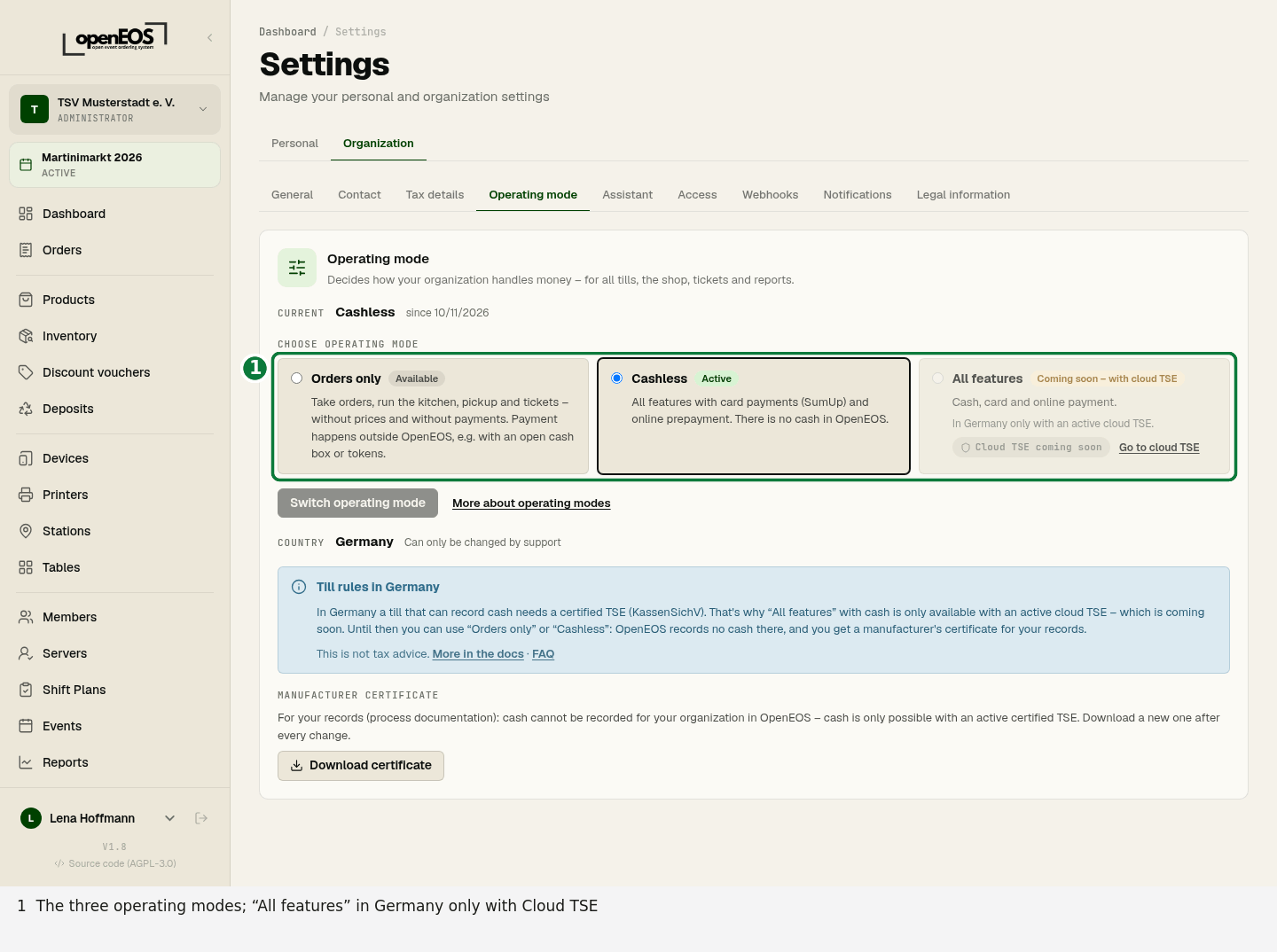
Only admins of the organization can do this. The tills switch immediately, no reload needed. Your organization's country must be set first.
Ideally switch between two events and not while sales are running.
Our support can also switch the operating mode, for example at your request. Support always gives a reason. The same rules apply to support: it can choose “All features” in Germany without an active TSE as well, but cash is only available with an active TSE, even through support.
History
Below the selection you see since when the current mode applies, and below that the History: every switch with its time, the person who made it and the old and new mode (for example “All features (existing) → Cashless”). Switches by our support are listed as “OpenEOS-Support” with the reason. Nobody can edit the history. This lets you show which mode applied when.
Manufacturer's certificate
As long as OpenEOS cannot record cash for your organization in Germany, admins find the Download certificate button under Settings → Organization → Operating mode: in Orders only, in Cashless and in All features without an active TSE (not in the existing status). The manufacturer's certificate is a PDF (in German) for your procedure documentation. It confirms that cash cannot be recorded in your organization and is only possible in OpenEOS with an active certified TSE, and it contains the history of operating modes. It also states that test payments are simulations without money.
In “All features” the certificate only covers the period without an active TSE: from the activation of the TSE on, cash payments are recorded TSE-secured.
Add the certificate to your procedure documentation. Download a new one after every change of the operating mode. The certificate is a helpful building block, but not proof with binding effect on the tax office: what matters is that your actual process matches what it certifies.
Country of the organization
Every organization in OpenEOS has a country. It is required, because it decides which till rules apply – in Germany, for example, that cash needs a TSE.
- New organizations choose the country when registering or under New organization. Germany, Austria and Switzerland are at the top of the list, followed by all other countries.
- Existing organizations without a country are asked once, in the dashboard and in the settings. An admin picks the country and confirms.
You set the country once. Afterwards only our support can change it, with a reason. That way it stays traceable which rule applied when. Under Settings → Organization → Contact you see the country read-only.
Germany
| Operating mode | Without a TSE | With an active cloud TSE |
|---|---|---|
| Orders only | available | available |
| Cashless | available | available |
| All features | available – card and online; cash only with the cloud TSE | available |
| All features (existing) | stays until you pick a mode or choose “with cloud TSE” when activating an event | – |
For “Orders only”, “Cashless” and “All features” without a TSE you get the manufacturer's certificate. New organizations start in “All features”.
Existing organizations: All features (existing)
Organizations that existed before the operating modes (November 2026) keep working as All features (existing) as before – also in Germany and also without a TSE – until you pick a mode. Nobody switches your organization automatically in the middle of the season.
If your organization is in Germany, a notice in the dashboard and in the settings explains the TSE requirement and asks you to confirm the country and pick an operating mode. When you activate an event, the payment dialog asks With cloud TSE (legally compliant cash)? – with Yes your operating mode becomes “All features” and the cloud TSE is set up automatically; with No nothing changes. Whether you record cash in OpenEOS without a TSE until then is your own responsibility; ideally check with your tax advisor.
If you pick an operating mode in Germany without an active TSE, the existing status ends – even if you confirm “All features”. The till then only accepts cash again with an active TSE; card and online keep working. You can choose “All features” itself again at any time. Our support cannot restore the existing status either.
Outside Germany and with an active TSE, choosing it explicitly (Confirm “All features”, then Confirm) changes nothing about the features; only the “(existing)” label disappears.
If you had already changed something before, OpenEOS carried it over: the former cashless mode and “Germany without cash” became Cashless, “Order only” became Orders only. The history shows an entry “Umstellung auf Betriebsarten” (switch to operating modes) for this.
Austria, Switzerland and other countries
Outside Germany you can choose all three operating modes freely, “All features” with cash also without a TSE. Check yourself whether OpenEOS is permissible for your club. This is not tax advice.
Austria
Austria has a cash register obligation (RKSV) from €15,000 annual turnover per business if more than €7,500 of it is cash turnover. Card payments count as cash turnover in Austria – also in the “Cashless” mode. OpenEOS currently creates no RKSV signature.
Exemptions exist, for example, for small festivals of non-profit clubs of up to 72 hours per calendar year and for canteens of non-profit clubs up to €45,000 annual turnover (net) if they are run on at most 52 days a year (limit since 2026). Further conditions apply to the exemptions. Check the rules for your club yourself or with your tax advisor.
Sources: Cash register obligation on the Austrian business service portal (USP) and cash registers at the Austrian Ministry of Finance (German).
Switzerland
To our knowledge, Switzerland has no general cash register or fiscalisation obligation. Record-keeping and VAT rules still apply to clubs. Check yourself or with your fiduciary or tax advisor what applies to your club.
Other countries
Many countries have their own rules for tills (e.g. Italy, France, Poland, Czechia). Check yourself whether OpenEOS is permissible for you there.
Self-hosted
If you run OpenEOS yourself, you are the operator of the system. New organizations start there as “All features (existing)” as before. The manufacturer's certificate does not exist there.